

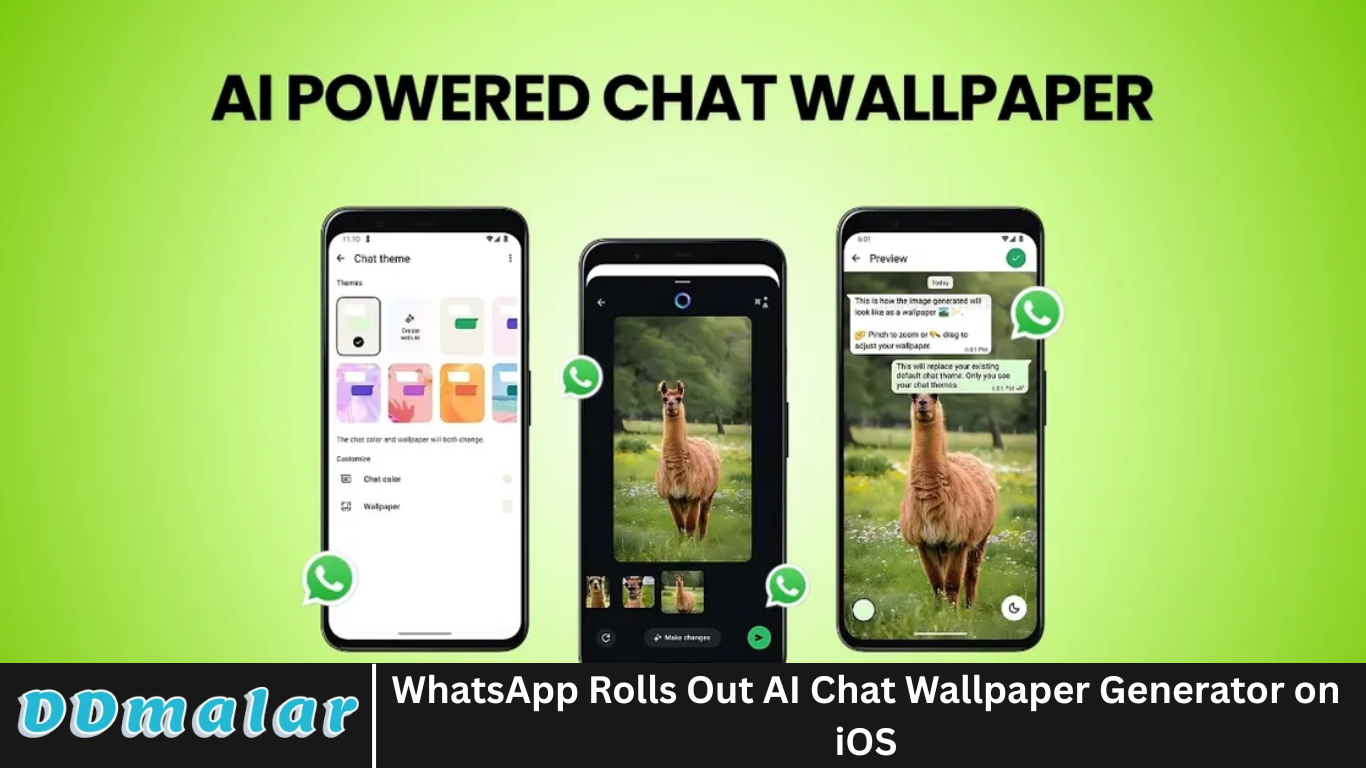
Meta-owned WhatsApp has unveiled yet another innovative feature aimed at personalizing the user experience: the AI-powered chat wallpaper generator. Exclusively rolling out for iOS users, this feature uses Meta AI to create visually stunning, contextually relevant wallpapers for individual and group chats.
In this article, we’ll explore what the AI chat wallpaper feature is, how it works, what makes it special, and how it might shape the future of personalization in messaging apps. Plus, we answer seven of the most frequently asked questions users are asking right now.
As artificial intelligence continues to transform how we communicate, this addition marks a new chapter in making chats not just functional—but beautiful and expressive too.
More Read: Nintendo Switch 2: Restocks & Prime Day Deals
What Is the AI Chat Wallpaper Generator?
The AI chat wallpaper generator is a new feature in WhatsApp for iOS that allows users to create custom backgrounds for their chats using text-based prompts. Powered by Meta’s proprietary large language model and image-generation tools, the feature lets users describe what they want to see in a wallpaper—like “sunset over the ocean with mountains in the distance” or “cyberpunk Tokyo at night”—and generates a high-quality image accordingly.
This is part of Meta’s broader push to integrate AI across its ecosystem, from Instagram to Messenger to Facebook and now WhatsApp.
How to Access and Use the Feature
To access the AI wallpaper generator:
- Update your WhatsApp to the latest iOS version from the App Store.
- Open a chat window (individual or group).
- Tap the chat wallpaper settings via the contact or group info screen.
- Look for the “Create with AI” option (under wallpaper options).
- Enter a text prompt describing your desired background.
- Review the generated options and select your favorite.
- Tap “Set as Wallpaper”, and it’s instantly applied.
Each wallpaper is generated on demand, meaning no two backgrounds are exactly alike unless users reuse the same prompt.
What Makes It Special?
The AI wallpaper generator isn’t just a gimmick—it offers several benefits and standout features:
Endless Customization
Unlike static pre-designed themes, users can create wallpapers tailored to their moods, interests, or specific chat dynamics. Want a cozy coffee shop for your bestie or a celestial galaxy for your sci-fi group? Just type it in.
Real-Time AI Rendering
Using Meta’s advanced generative AI, image rendering happens in seconds, delivering vivid, highly specific visuals without needing third-party design apps.
Personal Yet Private
The generated wallpapers live only on your device. Changing a wallpaper doesn’t affect the chat for other participants unless they do the same manually.
Popular Use Cases for AI Wallpapers on WhatsApp
While still new, early adopters have already found creative ways to use AI chat wallpapers:
- Thematic Group Chats: Families and friends create themed backgrounds for birthdays, holidays, or game nights.
- Business Branding: Freelancers and professionals use AI wallpapers that reflect their brand colors or services.
- Mood Enhancement: Users create calming scenes (like nature or zen gardens) to improve their chatting ambiance.
- Inside Jokes: A funny prompt tied to an inside joke becomes a wallpaper, adding personality to chats.
WhatsApp clearly leads in smart customization, giving it a competitive edge in the personalization department.
Privacy and Ethical Considerations
With any AI implementation, especially on a platform as vast as WhatsApp, privacy is a concern. So what’s happening behind the scenes?
- Local Prompt Use: According to Meta, prompts used to generate wallpapers are processed securely and are not shared with other users or stored for advertising purposes.
- No Sharing with Chat Partners: The wallpaper you generate is only visible on your device unless others create or apply the same theme manually.
- No Chat Data Access: Meta AI doesn’t scan chat history or messages to generate images—it only uses the input you provide in the prompt field.
Still, users should be cautious when entering sensitive or identifying prompts, especially if they’re unsure how the data is processed.
Pros and Cons
✅ Pros:
- Creative freedom: Generate nearly any scene you can imagine.
- Fast and responsive: Outputs are quick with minimal wait time.
- User-friendly: Clean interface that doesn’t overcomplicate the experience.
- Per-chat customization: Great for organizing different conversations.
❌ Cons:
- iOS-only (for now): Android users currently miss out.
- Limited to text prompts: No image-upload or blend option yet.
- Occasional inaccuracies: AI may misinterpret abstract prompts.
- May clutter UI if overused: Too many backgrounds might make it harder to focus.
What This Means for WhatsApp’s Future
The rollout of this feature signals Meta’s broader vision: making AI an everyday companion across all its platforms. For WhatsApp specifically, it shows a shift from being just a utility app to a visually expressive and AI-integrated communication platform.
We can likely expect future updates to include:
- Animated AI wallpapers
- Style filter options (e.g., watercolor, retro, pixel art)
- Community-shared prompts and templates
- Integration with profile pictures or emojis
Meta AI could eventually auto-suggest themes based on chat mood (similar to what Google does with email replies)—but that’s still speculative.
Frequently Asked Question
Is the AI wallpaper feature available for Android users?
Not yet. As of now, this feature is exclusive to iOS users, though an Android rollout is expected in future updates.
Can I edit the AI wallpaper after it’s created?
Currently, there are no in-app editing tools for generated wallpapers. However, you can re-enter the prompt to try again until you get the desired result.
Are my prompt texts or images stored by Meta?
According to Meta, your prompts are not used for advertising or training purposes. They are processed temporarily and privately, but exact data retention practices have not been made public.
Does changing the wallpaper affect the other person in the chat?
No. Chat wallpapers are local to your device. The other user(s) won’t see your AI-generated background unless they create or apply one themselves.
Can I use emojis or languages other than English in prompts?
Yes, Meta AI supports multiple languages and can interpret emojis to some extent. However, results may vary based on complexity or clarity.
Is the feature free or part of WhatsApp Premium?
The feature is currently free for all iOS users with the latest WhatsApp version. There’s no paywall or subscription requirement.
What kind of prompts work best for generating good wallpapers?
Descriptive prompts with visual details tend to produce better results. For example:
- ✅ Good: “Snowy forest under moonlight, northern lights in the sky”
- ❌ Poor: “Cool background”
- Be specific with colors, settings, and mood for best results.
Conclusion
The WhatsApp AI chat wallpaper generator is more than a cosmetic update—it’s a reflection of how AI is beginning to intersect with daily communication habits. While still in its infancy, the tool offers impressive creative potential, giving users the power to visually express themselves within a platform that has traditionally focused on simplicity and minimalism. By seamlessly integrating Meta’s AI into an already beloved app, WhatsApp is not just catching up with modern AI trends—it’s helping to define them.